So… Who Let the Interns Deploy GPT?
So there I am, minding my own business, when I get the message every infrastructure person dreads: “Hey, quick one — the dev team spun up some Foundry thing and connected it to SharePoint. Is that… okay?”
Narrator: it was not okay.
Public endpoint wide open. API keys pasted into a config file. An agent with Bing grounding turned on, happily shipping chunks of internal questions out to the public internet. And the content filters? Whatever the defaults were the day somebody clicked Create.
Now before anyone gets clever in the comments — yes, I know, it’s not even called Azure Foundry anymore. It went Azure AI Studio → Azure AI Foundry → Microsoft Foundry, and the RBAC roles got renamed again in May 2026 just to keep us humble. I’m going to call it Foundry for the rest of this post and you’re going to let me.
Here’s the thing nobody tells you up front: Foundry is not a chatbot, it’s a platform. It has identities, network paths, data at rest, model deployments, tools that reach out to the internet, and agents that make decisions on their own. That’s not an AI problem. That’s an infrastructure security problem wearing an AI hoodie. And we already know how to solve those.
So today we’re locking it down properly — network, identity, RBAC, guardrails, gateway, data and detection — with the commands, the gotchas, and the stuff the architecture slides conveniently skip. Grab a coffee. This one’s long.
What Are We Actually Defending Against?
Before we start building walls, let’s be honest about what goes wrong with a Foundry deployment. It’s rarely the model going rogue. It’s usually us.
| What goes wrong | What it looks like in real life | Layer that fixes it |
|---|---|---|
| Wide-open endpoints | Public network access on, anyone with a key gets in | 1 — Network |
| Leaked or shared keys | API key in a repo, a config file, a Teams chat | 2 — Identity |
| Over-privileged people and agents | Everybody is Owner “because it was easier” | 3 — RBAC |
| Jailbreaks and prompt injection | A poisoned document tells the agent to email out the customer list | 4 — Guardrails |
| Data walking out the door | Bing/SharePoint grounding, partner models, Global deployments | 1, 0 and 6 |
| Runaway cost | An agent stuck in a loop burning tokens all weekend | 5 — Gateway |
| Nobody noticing any of the above | Alerts going to a mailbox nobody reads | 7 — Detect |
Here’s how the layers line up along a single request:
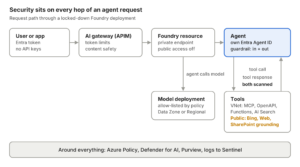
Every hop has a control: Entra on the way in, the gateway in front, a private endpoint on the resource, an identity and guardrails on the agent, and scanning on both directions of every tool call. Note the orange bit — some tools still talk to the public internet even in a “private” setup. We’ll get to that.
Layer 0: Decide Before You Click Create (Seriously)
This is the part that bites everyone, so it goes first: Foundry locks in a bunch of security decisions at resource creation. Agent networking in particular is create-time only. You can’t bolt VNet injection onto an existing Foundry resource, and you can’t change the delegated subnet later. You redeploy. Ask me how I know.
Resource vs. project — draw your boundaries
The mental model is simple:
- Foundry resource (account) — the security boundary. Networking, encryption, local auth, model deployments and connected services live here.
- Project — the team/workload boundary. Agents, evaluations, files and project-scoped RBAC live here.
My rule of thumb: one Foundry resource per data classification + environment (e.g. fdy-internal-prod, fdy-internal-dev, fdy-confidential-prod), and projects per team or app inside it. If two workloads need different network rules or different keys, they need different resources. Don’t try to make one resource serve everybody — that’s how you end up with the intern’s SharePoint agent sharing a blast radius with HR.
Tag it like you mean it
Microsoft’s own governance session for Foundry deploys the baseline with Bicep and tags it with owner, classification, criticality, cost center, environment and expiry. Steal that. The expiry tag alone will save you from the 47 abandoned “poc-gpt-test-2” resources you’ll find in six months.
Control which models people can deploy
Foundry now ships two built-in Azure Policy definitions for this, and you want both:
| Policy | What it answers |
|---|---|
| Foundry model deployments should only use approved models | Is this exact model (or publisher) on our allow-list? |
| Foundry model deployments should meet eligibility requirements | Does the model meet our rules — e.g. Direct from Azure only, no Preview models? |
The eligibility policy has an onlyAllowDirectFromAzure parameter that denies anything not sold directly by Azure. That matters because Microsoft’s guardrails apply to Foundry Models sold by Azure, and partner models run under the partner’s own data terms.
# Find the built-in definition
az policy definition list \
  --query "[?displayName=='Foundry model deployments should only use approved models'].{name:name, id:id}" \
  -o table

# Check the parameter names before you write your params file
az policy definition show --name <definition-name> --query parameters

# Assign it to the Foundry resource group
az policy assignment create \
  --name "allow-only-approved-models" \
  --display-name "Allow only approved models" \
  --policy "<definition-id>" \
  --scope "/subscriptions/<sub>/resourceGroups/rg-foundry-prod" \
  --params @approved-models.json
Pro tip: Microsoft’s governance playbook stages policy assignments in DoNotEnforce first, reviews the impact, then flips to Default. Do the same. Nothing makes friends faster than a Deny policy that breaks the data science team’s demo on a Friday.
While you’re in Azure Policy, add the boring-but-important ones too: allowed locations, required tags, and (if you have an EU Data Boundary or similar commitment) deny Global deployment SKUs. More on that in the data section.
Layer 1: Network Isolation — Close the Front Door AND the Back Door
Foundry has three network planes and you control them separately:
- Inbound — traffic to the Foundry resource.
- Outbound — traffic from the resource to its dependent services (Storage, Key Vault, AI Search, Cosmos DB).
- The agent runtime — where your agents actually execute and make their tool calls.
Most people lock down #1, high-five each other, and go to lunch. Don’t be most people.
Inbound: private endpoint + public access off
Classic Azure. Portal path: Foundry resource → Resource Management → Networking → Private endpoint connections → + Private endpoint, target sub-resource account. Whoever creates the endpoint needs Network Contributor on the VNet; approving it needs Contributor or Owner on the resource.
Then kill public access:
az resource update \
  --ids "/subscriptions/<sub>/resourceGroups/rg-foundry-prod/providers/Microsoft.CognitiveServices/accounts/fdy-internal-prod" \
  --set properties.publicNetworkAccess=Disabled
The DNS gotcha that will eat your afternoon
A Foundry account answers on three DNS namespaces, so you need three private DNS zones linked to the VNet:
privatelink.cognitiveservices.azure.comprivatelink.openai.azure.comprivatelink.services.ai.azure.com
Miss one and you get the most maddening symptom in Azure: some SDK calls resolve privately and work, others resolve publicly and throw a 403. Same app, same identity, same minute. If you run your own DNS (hello, AD-integrated DNS on the domain controllers), add conditional forwarders for all three zones to 168.63.129.16.
# On your DNS servers — forward all three Foundry zones to Azure DNS
'privatelink.cognitiveservices.azure.com',
'privatelink.openai.azure.com',
'privatelink.services.ai.azure.com' | ForEach-Object {
    Add-DnsServerConditionalForwarderZone -Name $_ `
        -MasterServers 168.63.129.16 -ReplicationScope Forest
}
And yes — the private endpoints for your Cosmos DB, Storage and AI Search aren’t created for you. Each one needs its own endpoint and DNS zone.
The agent runtime: delegated subnet (create-time only!)
With the standard agent setup you inject the agent runtime into a subnet in your own VNet. The requirements are very specific:
| Requirement | Value |
|---|---|
| Subnet delegation | Microsoft.App/environments (agents run on Container Apps infrastructure) |
| Size | /27 minimum, /24 recommended |
| Dedicated? | Yes — one subnet per Foundry resource |
| Region | VNet in the same region as the Foundry resource |
| Bring-your-own data | Cosmos DB (threads/messages), Storage (files), AI Search (vector stores) |
The payoff: conversation history and uploaded files live in your tenant, under your encryption and residency rules. Don’t hand-roll this — Microsoft publishes Bicep and Terraform for it (sample 15, private-network-standard-agent-setup, in the microsoft-foundry/foundry-samples repo). The dependency chain is long and the deploying identity needs Foundry Account Owner at subscription scope plus role-assignment rights.
“It’s all private!” …Is it though?
Here’s what the slides skip. Even with a fully injected setup, not every agent tool travels through your VNet:
| Traffic path | Tools |
|---|---|
| Through your VNet subnet | Private MCP servers, OpenAPI tool, Azure Functions, A2A, Azure AI Search (via private endpoint) |
| Microsoft backbone | Function calling, Code Interpreter (no file up/download in BYO VNet) |
| Public endpoints | Grounding with Bing, Web Search, SharePoint grounding |
| Not supported behind VNet | Logic Apps, File Search, Browser Automation, Computer Use, Image Generation, Fabric Data Agent |
Read that third row again. Bing and SharePoint grounding leave your boundary even when everything else is private. That was exactly my intern scenario. If your rule is “no public endpoints, period,” block those tools with Azure Policy — don’t assume the VNet catches them. Also note trace ingestion to Application Insights has no private path yet, so put the monitoring FQDNs on your firewall allow-list.
Hosted agents: egress controls (preview)
If you’re running hosted agents, there’s a newer control worth knowing about: network egress controls (preview) live inside the same guardrail object as your content controls and govern which outbound destinations the agent can reach. Allow-list, not deny-list. And if you need real in-path inspection (TLS decryption, east-west containment), that’s still a job for your firewall/NVA with UDRs on the agent subnet — Foundry won’t do that part for you.
Layer 2: Identity — Kill the Keys, Meet Agent ID
Step one: turn off API keys. Today.
Key-based auth is the root of most Foundry horror stories. Whoever holds the key gets everything, there’s no user attribution in the logs, it bypasses RBAC, and — here’s the kicker — anything authenticating with an API key bypasses Conditional Access entirely. Agents and evaluations don’t even accept keys, so there’s no good reason to leave them on.
In Bicep:
properties: {
  allowProjectManagement: true
  customSubDomainName: 'fdy-internal-prod'
  publicNetworkAccess: 'Disabled'
  disableLocalAuth: true   // API keys stop working; Entra ID only
}
Or on an existing resource:
az resource update \
  --ids "/subscriptions/<sub>/resourceGroups/rg-foundry-prod/providers/Microsoft.CognitiveServices/accounts/fdy-internal-prod" \
  --set properties.disableLocalAuth=true
Before you flip it in prod, go find every app still using a key. They’re about to break, and it’s better they break on your schedule than at 2 AM.
Microsoft Entra Agent ID — agents are identities now
This is the genuinely new bit. Since Entra Agent ID went GA in April 2026, agents are first-class identities in Entra — visible, governable and revocable like users and service principals.
How it plays out in Foundry:
- When the first agent in a project is created, Foundry provisions an agent identity blueprint plus a shared agent identity for the project. All dev agents share it.
- When you publish an agent, it gets its own dedicated blueprint and identity.
- At runtime there are no secrets — the blueprint has a federated credential trust with the project’s managed identity, and Entra issues short-lived tokens scoped to a specific audience (e.g.
https://graph.microsoft.com).
Wrong audience = auth failure even when RBAC is perfect. Remember that when you’re debugging.
The publish trap
This one got me. Publishing creates a new identity, so the role assignments you gave the dev identity don’t carry over. The agent works beautifully in dev and faceplants in production with access denied everywhere. Put “re-assign RBAC to the published agent identity” on your release checklist in big red letters.
# Grant the PUBLISHED agent identity what it needs — least privilege
az role assignment create \
  --assignee "<publishedAgentIdentityId>" \
  --role "Storage Blob Data Reader" \
  --scope "/subscriptions/<sub>/resourceGroups/<rg>/providers/Microsoft.Storage/storageAccounts/<sa>"
Govern agents like you govern people
Open the Entra admin center → Agent ID → All agent identities and you’ll see every agent in the tenant — Foundry, Copilot Studio, third-party. From there you can:
- Apply Conditional Access to agents
- Watch risky agents in Identity Protection
- Put lifecycle governance on them — owners, sponsors, expiration
Two Conditional Access gotchas: “All users” policies don’t include agent user accounts — you need to target agents explicitly — and, again, API keys skip CA completely. Treat every agent like a new hire: it gets an identity, a manager, least privilege, and an end date.
Layer 3: RBAC — Who Gets to Touch What
In May 2026 Microsoft renamed the built-in roles (Azure AI User → Foundry User, and so on). Role IDs and permissions didn’t change, so nothing broke — but you’ll see both names floating around the portal for a while. Here are the five that matter:
| Role | What it can do | Give it to |
|---|---|---|
| Foundry Agent Consumer | Call agent endpoints only | End users, calling apps |
| Foundry User | Build agents, run evals, call models — no deploy, no publish | Developers |
| Foundry Project Manager | Foundry User + manage projects and publish agents | Team leads |
| Foundry Account Owner | Create accounts/projects, deploy models, create guardrails — no data-plane build actions | Platform team |
| Foundry Owner | Everything, control plane and data plane | Break-glass, IaC pipeline |
Three things that will confuse your team
1. Subscription Owner ≠ Foundry access. Azure Owner/Contributor doesn’t include data actions. Your sub owner can create the resource but can’t build or call agents. I’ve watched this confuse senior people in every single rollout.
2. The portal lies about the name. The role picker shows the agent-consumer role as Foundry Project Runtime User. Same role, same ID (eed3b665-ab3a-47b6-8f48-c9382fb1dad6). Don’t spend 20 minutes searching IAM for a name that isn’t there.
3. Script with GUIDs, not display names. While the rename rolls out, that’s Microsoft’s own guidance. Foundry User is 53ca6127-db72-4b80-b1b0-d745d6d5456d.
Scope it down to a single agent
Role assignments work at account, project — and even single agent scope (evaluated for endpoint access). So your line-of-business app gets to call exactly one agent and nothing else:
# Foundry Agent Consumer on ONE agent only
az role assignment create \
  --assignee "<app-sp-object-id>" \
  --role "eed3b665-ab3a-47b6-8f48-c9382fb1dad6" \
  --scope "/subscriptions/<sub>/resourceGroups/rg-foundry-prod/providers/Microsoft.CognitiveServices/accounts/fdy-internal-prod/projects/hr-assistant/agents/BenefitsAgent"
If you’ve lived in Active Directory as long as I have, this is just AGDLP with a new coat of paint: put humans in groups, assign roles to groups, never to individuals, and keep Foundry Owner in a PIM-eligible group with approval. Your future auditor will thank you.
Layer 4: Guardrails — Teaching the Robot Some Manners
If you remember “content filters,” good news: they grew up. Foundry now calls them Guardrails (the docs literally say previously content filters), and the model is cleaner:
- A guardrail is a named collection of controls.
- Each control = a risk to detect + the intervention points to scan + the action to take.
They’re powered by Azure AI Content Safety classifiers under the hood. Model guardrails are GA; agent guardrails are still preview.
The four intervention points
| Intervention point | What gets scanned | Models | Agents |
|---|---|---|---|
| User input | The prompt sent in | ✅ | ✅ |
| Tool call (preview) | What the agent is about to send to a tool | — | ✅ |
| Tool response (preview) | What comes back from the tool | — | ✅ |
| Output | The final answer to the user | ✅ | ✅ |
Those two middle rows are the whole ballgame for agents. Indirect prompt injection lives in the tool response — a poisoned PDF in SharePoint, a sketchy web page from Bing grounding, a malicious ticket comment — and that’s where you need to catch it.
The risks you can detect
| Risk | Models | Agents (preview) |
|---|---|---|
| Hate, Sexual, Self-harm, Violence | ✅ | ✅ |
| User prompt attacks (jailbreaks) | ✅ | ✅ |
| Indirect attacks | ✅ | ✅ |
| Protected material (text and code) | ✅ | ✅ |
| PII (preview) | ✅ | ✅ |
| Task adherence (preview) | ✅ | ✅ |
| Spotlighting (preview) | ✅ | ❌ |
| Groundedness (preview) | ✅ | ❌ |
Harm categories use severity thresholds — Low (flags low severity and above, so it catches the most), Medium, High (flags only the worst). Off exists, but only for customers approved through Microsoft’s modified-guardrails review.
Actions: models support Annotate or Annotate and block. Agents currently support Annotate and block only — so there’s no “log-only” soft launch for agent controls. Test in dev first.
THE trap: agent guardrails override, they don’t merge
Read this twice. An agent’s guardrail fully replaces its model’s guardrail. It does not merge.
The inheritance rules:
- Custom guardrail assigned to the agent → only that one counts.
- No custom guardrail → the agent inherits the guardrail of its model deployment.
- The agent only gets Microsoft.DefaultV2 if the model uses it or you assign it explicitly.
So if your model deployment has Violence set strict on input and output, and some well-meaning developer assigns a slim agent guardrail with Violence set loose and no tool-call controls — congratulations, tool calls and tool responses are now not scanned for violence at all. Silently. Always check the effective guardrail, not the one you think is applied.
Also: if you stuff Groundedness or Spotlighting into a guardrail and assign it to an agent, those controls simply don’t run on the agent. No error. Check the applicability table above before you promise anything to compliance.
My baseline guardrail for production agents
You build these per project under Build → Guardrails, and get the fleet view under Operate → Compliance → Guardrails. Creating them needs Foundry Account Owner.
- Hate / Sexual / Self-harm / Violence at Medium on all four intervention points (Medium is the default — the point is to cover tool call and tool response too).
- Prompt Shields — user prompt attacks on input, indirect attacks on tool response.
- PII (preview) on output and tool call — stop the agent from shipping SSNs to a third-party API.
- Protected material for text and code on output.
- Task adherence (preview) — flags when the agent wanders off its instructions or its tool calls go sideways.
- A custom blocklist with internal codenames, project names and anything that should never leave the building (regex supported).
- Egress controls (preview) if it’s a hosted agent.
Then assign it explicitly to every agent, so nobody inherits something weird from a model deployment.
Note: Guardrails cover Foundry Models sold by Azure (audio transcription excluded) and agents built in Foundry Agent Service — not other agents registered in the Foundry Control Plane. If it wasn’t built there, you’ll need the gateway layer below.
Layer 5: The AI Gateway — A Bouncer at the Door
Guardrails govern what the model and agent say. They don’t govern how much, who’s calling, or what it costs. That’s what the AI gateway in Azure API Management is for. It’s not a separate product — it’s APIM’s existing gateway with LLM-aware policies — and it can now be wired directly into a Foundry resource (preview), with telemetry showing up in Foundry or Application Insights.
Why bother if you already have guardrails?
- One front door for every app calling every model — Foundry, Azure OpenAI, anything OpenAI-compatible.
- Token-based limits per consumer, so one runaway agent loop doesn’t burn the whole quota (or budget).
- Content safety at the edge for traffic guardrails don’t cover — like agents built outside Foundry Agent Service.
- Usage metrics per team/app for chargeback.
- It’s a prerequisite for the Foundry Control Plane, so you’ll want it eventually anyway.
The two policies that matter
llm-token-limit counts prompt and completion tokens and can pre-calculate prompt tokens so oversized requests never even hit the backend. (Plain old rate-limit-by-key counts requests and is blind to token cost — don’t use it for this.)
llm-content-safety forwards prompts to Azure AI Content Safety at the gateway.
<inbound>
    <base />
    <!-- Managed identity to the Foundry backend — no keys -->
    <authentication-managed-identity resource="https://cognitiveservices.azure.com" />

    <!-- Token budget per subscription (i.e. per app/team) -->
    <llm-token-limit
        counter-key="@(context.Subscription.Id)"
        tokens-per-minute="20000"
        estimate-prompt-tokens="true"
        remaining-tokens-header-name="x-remaining-tokens" />

    <!-- Content safety + Prompt Shields at the edge -->
    <llm-content-safety backend-id="content-safety-backend" shield-prompt="true">
        <categories output-type="EightSeverityLevels">
            <category name="Hate" threshold="4" />
            <category name="Violence" threshold="4" />
            <category name="SelfHarm" threshold="4" />
            <category name="Sexual" threshold="4" />
        </categories>
    </llm-content-safety>

    <!-- Emit token metrics per app for chargeback -->
    <llm-emit-token-metric namespace="llm-metrics">
        <dimension name="Subscription ID" />
        <dimension name="API ID" />
    </llm-emit-token-metric>
</inbound>
Two gotchas: llm-token-limit and llm-content-safety are not available on the Consumption tier, and policy element order matters. Pick the tokens-per-minute number from your actual quota — the 20,000 above is a placeholder, not a recommendation.
And remember the golden rule: a gateway doesn’t replace guardrails, and guardrails don’t replace a gateway. Defense in depth, not defense in either/or.
Layer 6: Data — Keys, Residency and the Question Your DPO Will Ask
Customer-managed keys (only if you actually need them)
By default Microsoft manages the encryption keys (AES-256). If compliance demands it, bring customer-managed keys from Key Vault or Managed HSM. Portal path: Foundry resource → Resource Management → Encryption → Customer-Managed Keys.
Requirements checklist:
- Key Vault in the same region as the Foundry resource
- Soft delete and purge protection enabled
- RSA key, 2048 bits minimum
- A managed identity with Key Vault Crypto User (or wrap/unwrap permissions)
Warning: CMK is a one-way door. You can go from Microsoft-managed to CMK, but not back. Don’t turn it on “just to see.”
The nice part of the standard agent setup: threads, files and vectors live in your Cosmos DB, Storage and AI Search, so encryption and residency just follow those resources. Apply each service’s own CMK there.
Deployment type = where your prompts get processed
This is the one people miss:
| Deployment type | Where prompts are processed |
|---|---|
| Standard / Regional | Within the region’s geography |
| Data Zone | Within the chosen data zone (e.g. EU) |
| Global | Anywhere in the world — data at rest stays in your geography, processing doesn’t |
If your org has committed to the EU Data Boundary or similar, use Data Zone or Regional deployments and block Global SKUs with Azure Policy.
“Is Microsoft training on our data?”
Your DPO will ask. The answer: for models sold by Azure, prompts and completions aren’t used to train the models and aren’t shared with the model providers. Partner models (yes, including Anthropic’s Claude) run under the partner’s data terms — read them before you route regulated data there. That’s another reason the onlyAllowDirectFromAzure policy from Layer 0 exists.
Purview: treat prompts as data
Prompts and responses are data — often your most sensitive data, pasted in by users who should know better. Purview’s data security and compliance policies extend to AI interactions in Foundry, so the sensitivity labels, DLP and audit you already run for M365 can follow the conversation. Wire it up so your compliance team sees AI interactions in the same consoles they already staff instead of a brand-new silo.
Layer 7: Detect, Respond, and Attack Yourself First
Guardrails block things. Somebody still needs to know they were blocked — and notice when the same user tries 40 jailbreaks in an hour.
Defender for Cloud — AI Services plan
Turn on the Defender for AI Services plan. Since February 2026 it covers agents built with Foundry too. It correlates Prompt Shields signals with Microsoft threat intel and raises alerts — jailbreak attempts, data leakage, credential theft — straight into Defender XDR, where your SOC already lives.
az security pricing create --name AI --tier Standard
Pair it with the Data and AI security dashboard in Defender for Cloud for posture: inventory of AI resources, coverage gaps, misconfigurations and attack paths. And because I can already hear the question: Defender does not replace guardrails. Guardrails stop the bad prompt; Defender tells you someone’s trying.
If you’re already running Sentinel, this is where it gets fun — those XDR alerts flow into Sentinel, and you can build a “who’s poking our AI” workbook (or Power BI report) right next to your sign-in risk data.
Logging you’ll want on day one
- Diagnostic settings on the Foundry resource → Log Analytics (audit + request logs)
- Application Insights connected to the project for agent traces (remember the firewall FQDNs — no private path yet)
- APIM gateway logs + token metrics from Layer 5
- Activity Log alerts on guardrail changes, role assignments and
disableLocalAuthflipping back tofalse
That last one is my favorite. If somebody “temporarily” re-enables API keys, you want to know before lunch, not at the next audit.
Red team it before the internet does
Foundry includes an AI Red Teaming Agent that throws adversarial prompts at your agents to find jailbreaks, prompt-attack weaknesses and other holes. Run it:
- Before an agent’s first publish
- After any guardrail change (remember: override, not merge)
- After you add a new tool — especially anything that pulls in outside content
Then do the old-school version too: grab a colleague, give them a coffee, and tell them to make the HR bot say something it shouldn’t. You’ll learn more in 30 minutes than from any dashboard.
The “Just Tell Me What to Do” Checklist
Here’s the order I’d roll this out in. Steps 1–3 are create-time decisions — get them wrong and you’re redeploying.
- ☐ Pick your resource boundaries (classification + environment) and tag everything, including an expiry
- ☐ Assign model allow-list + eligibility policies (DoNotEnforce first, then enforce)
- ☐ Deploy with network isolation from day one — private endpoint, public access off, delegated agent subnet (sample 15)
- ☐ Create all three private DNS zones and forward them from on-prem DNS
- ☐ Block Bing/Web/SharePoint grounding with policy if “no public endpoints” is a hard rule
- ☐
disableLocalAuth: true— Entra only, no API keys - ☐ RBAC: devs get Foundry User on the project, apps get Foundry Agent Consumer on one agent, Owner in PIM
- ☐ Re-assign RBAC to every published agent identity
- ☐ Conditional Access policies that explicitly target agents
- ☐ Baseline guardrail on all four intervention points, assigned explicitly to every agent
- ☐ AI gateway in APIM with token limits and content safety
- ☐ Data Zone or Regional deployments if residency matters; block Global SKUs
- ☐ CMK only if compliance explicitly requires it (one-way door!)
- ☐ Defender for AI Services on, alerts flowing to XDR/Sentinel
- ☐ Diagnostic logs + alerts on guardrail, RBAC and local-auth changes
- ☐ Red team before every publish
Gotchas, Rapid-Fire
- VNet injection can’t be retrofitted. Decide before the first deployment.
- Three DNS zones, not one. Random 403s = missing zone.
- “Private” doesn’t mean every tool is private. Bing and SharePoint grounding go public.
- Publishing = new identity = empty permissions.
- “All users” CA policies skip agents. Target them explicitly.
- Agent guardrails override, never merge. Check the effective set.
- Groundedness and Spotlighting don’t run on agents. No error, they just don’t.
- The portal calls it Foundry Project Runtime User. Script with GUIDs.
- Subscription Owner can’t build agents. Data actions aren’t included.
- API keys “just for testing” bypass everything in this post.
Wrapping Up
The good news? None of this is exotic. Private endpoints, DNS, Entra, RBAC, Conditional Access, Azure Policy, Defender, Sentinel — these are muscles every infrastructure team already has. Foundry just gives us a new thing to point them at, plus one genuinely new layer (guardrails) that behaves a little differently than you’d expect.
Treat every agent like a new hire: it gets an identity, a manager, least privilege, a network policy, and somebody watching the logs. Do that, and the next time someone asks “is that… okay?” you’ll actually be able to say yes.
As always, stay cloudy my friends.
— Jay
Sources
- Guardrails and controls overview in Microsoft Foundry — Microsoft Learn
- Built-in policies for model deployment in Microsoft Foundry — Microsoft Learn
- AI gateway in Azure API Management — Microsoft Learn
- Plan your Microsoft Foundry deployment — Microsoft Learn
- Microsoft Foundry platform baseline and landing-zone guardrails — Microsoft AI governance sessions
- Building Secure, Governable AI Agents with Microsoft Foundry — Microsoft Tech Community
- Secure Microsoft Foundry: Network, Identity and Guardrails — Jannik Reinhard
